This post is sponsored by Travelsim Asia.
Introduction
Globe’s standard Roam Surf rate is ₱399 a day. Pay that daily for a two-week trip and you spend ₱5,586 just to stay online. Telco data packs bring that down, but many travel eSIMs cost less again. The catch is that many of them ask you to download an app and create an account before you can even buy a plan.
This Travelsim Asia review looks at an eSIM that skips both. It covers how the service works, how much it costs in pesos, which regional pack fits which trip, how it performs in the Philippines, and how to set it up so your home SIM stays reachable for calls, texts and bank verifications.
Quick verdict
- What it is: a data-only travel eSIM focused on Asia, bought and managed without an app
- Price: from $2.99 (about ₱188) for 1GB in the Philippines or South Korea
- Philippine network: access to both Smart and Globe
- Plan type: fixed data, with hotspot allowed on every plan
- Best for: Filipino travelers heading around Asia, and foreign tourists island-hopping in the Philippines
- Not for: heavy streamers who need unlimited data, or anyone who needs a local phone number
Table of Contents
What Is Travelsim Asia?
Travelsim Asia is a travel eSIM provider that sells prepaid, data-only plans for Asia through its website, travelsimasia.com. Its terms of service are governed by Dutch law. It offers single-country plans for 13 destinations and five multi-country packs.
The name causes some confusion. Travelsim Asia is a separate company from TravelSim (travelsim.com) and from eTravelSim. When buying, make sure the address bar says travelsimasia.com.
How is Travelsim Asia different from other eSIM brands?
There is no app and no account to create. You pick a plan on the website, pay, and an email arrives within about five minutes with an install link and a QR code.
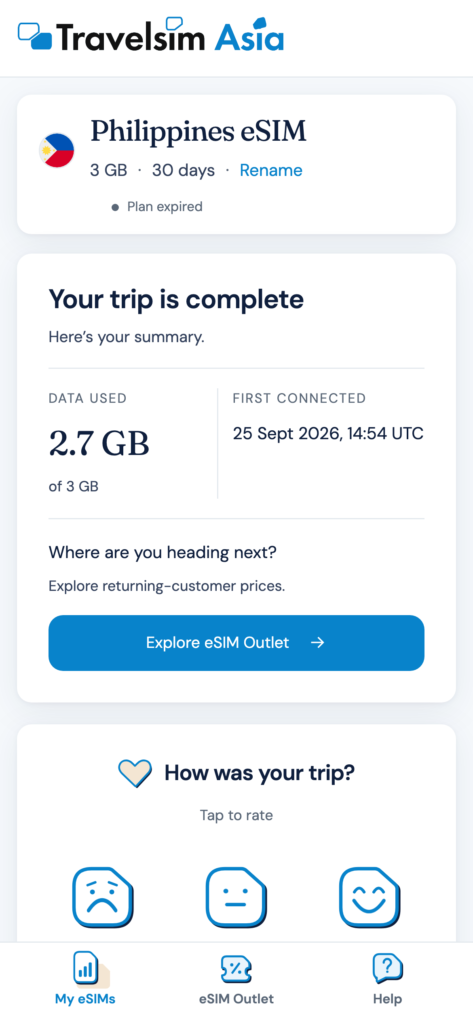
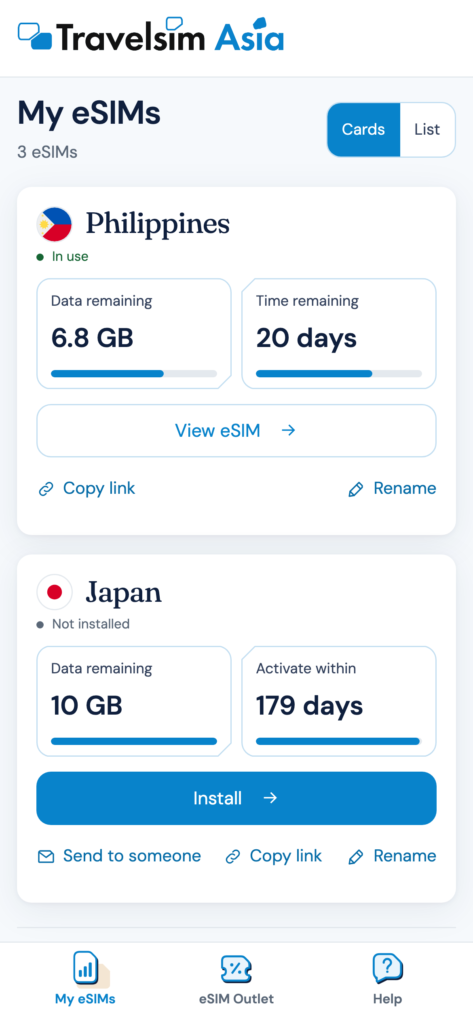
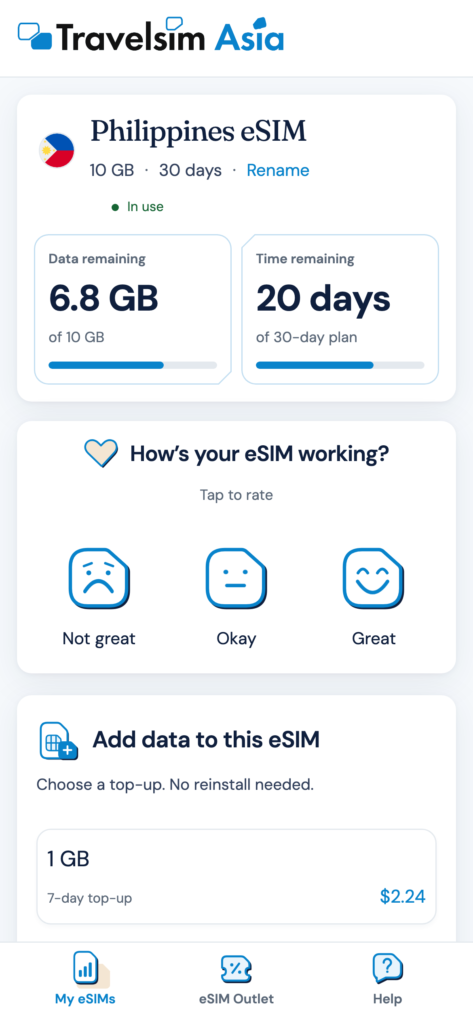
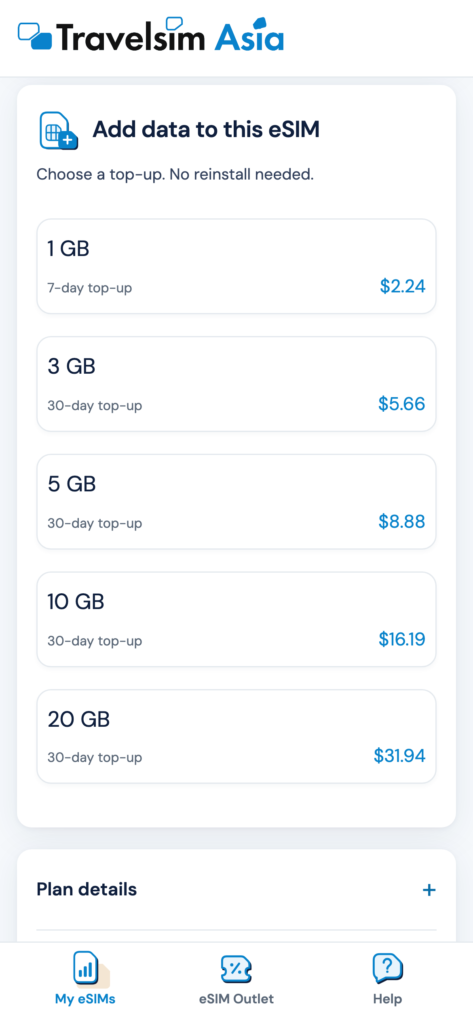
That same email holds a link to a personal web dashboard. From there, you can check how much data is left and buy top-ups that load straight onto the eSIM you already installed. On an active Philippines eSIM, the dashboard shows your data remaining and days left at a glance, lists top-ups starting at $2.24 (about ₱141) for 1GB over 7 days, and lets you rate the signal where you are.
This matters on the road. You don’t need phone storage for another app, and you don’t need to sign up over weak airport Wi-Fi. You won’t get app notifications, but you’re not left guessing either. Travelsim Asia emails usage updates at 50%, 80% and 90% data usage and when your data runs out, plus a notice before your plan expires.
How does Travelsim Asia customer support work?
Support runs by email at support@travelsimasia.com or through the contact form on the website. Since this is an eSIM without an app, there’s no in-app live chat or WhatsApp line. The company describes itself as a small team of real people and says it offers 24/7 support, with replies ranging from minutes to a few hours.
For connection problems after arrival, the setup section below covers the quick fixes to try first.
Travelsim Asia Plans and Prices in 2026
Travelsim Asia sells fixed-data plans only, from $1.99 for 1GB in Thailand up to $54.99 for 50GB over 180 days. Peso prices below use a rate of about ₱62.8 to $1 (mid-October 2026), rounded to the nearest peso.
Which Asia regional pack should you choose?
More countries doesn’t mean a better pack. Each one includes and leaves out different places, so match the pack to your route.
Pack (10GB / 30 days) | Price | Coverage |
|---|---|---|
Asia 14 | $19.99 (₱1,255) | Japan, South Korea, Taiwan, Thailand, Vietnam, Laos, the Philippines and more. No Singapore or Mainland China. |
Malaysia, Thailand, Singapore | $22.99 (₱1,444) | Those three countries only. |
Asia 7 | $23.99 (₱1,507) | Philippines, Singapore, Malaysia, Thailand, Vietnam, Indonesia, Cambodia. No Japan, Korea, Taiwan or China. |
China, Hong Kong, Macau | $24.99 (₱1,569) | Those three destinations only. |
Asia 12 | $42.99 (₱2,700) | Singapore, Mainland China, Japan, Macau, Malaysia and more. No Philippines or Laos. |
How much are single-country plans?
For a trip to one country, a single-country plan gives the best value per gigabyte.
Philippines
Plan | Price |
|---|---|
1GB / 7 days | $2.99 (₱188) |
3GB / 30 days | $6.99 (₱439) |
5GB / 30 days | $10.49 (₱659) |
10GB / 30 days | $14.99 (₱941) |
20GB / 30 days | $29.99 (₱1,883) |
Japan
Plan | Price |
|---|---|
1GB / 7 days | $3.49 (₱219) |
3GB / 15 days | $6.99 (₱439) |
5GB / 30 days | $9.99 (₱627) |
10GB / 30 days | $15.99 (₱1,004) |
20GB / 30 days | $22.99 (₱1,444) |
50GB / 30 days | $34.99 (₱2,197) |
South Korea
Plan | Price |
|---|---|
1GB / 7 days | $2.99 (₱188) |
3GB / 15 days | $6.99 (₱439) |
5GB / 30 days | $11.99 (₱753) |
10GB / 30 days | $16.99 (₱1,067) |
20GB / 30 days | $23.99 (₱1,507) |
UAE: 1GB / 7 days for $7.99 (₱502), 3GB / 30 days for $14.99 (₱941), and 5GB / 30 days for $17.99 (₱1,130). There are no 10GB or 20GB plans for the UAE.
Why no unlimited plans?
Travelsim Asia keeps every plan fixed-data, so you know exactly how much you’re buying. Unlimited plans elsewhere usually slow down after a daily limit. If you run low, buy a top-up from the dashboard; it loads onto the same eSIM.
How much data do you need?
For most Asia trips, 5GB to 10GB covers a week or more of maps, Grab, messaging, e-wallet payments and social media. Most of that is steady, light use throughout the day rather than long streaming sessions.
- Short city break (3 to 5 days): 3GB to 5GB
- One week with daily Grab and maps: 10GB
- Sharing a hotspot with family or working on a laptop: 20GB, or plan on a top-up
When in doubt, start smaller. Topping up from the dashboard takes a minute and loads straight onto the same eSIM.
What else should you know?
- Hotspot: allowed on every plan, at no extra charge.
- Data only: no local number, no SMS and no calls. Use Viber, WhatsApp or Messenger instead.
- Validity: you have 180 days from purchase to make the first connection. The plan’s days only start counting when the eSIM first connects to a network at your destination.
- Refunds: within 14 days of purchase, but only if the QR code was never scanned and the eSIM never installed. Refunds are processed within 7 business days, and aren’t given if your phone turns out to be incompatible.
- Payment: credit and debit cards, PayPal, Apple Pay, Google Pay, Klarna and UnionPay.
Does Travelsim Asia Work in the Philippines?
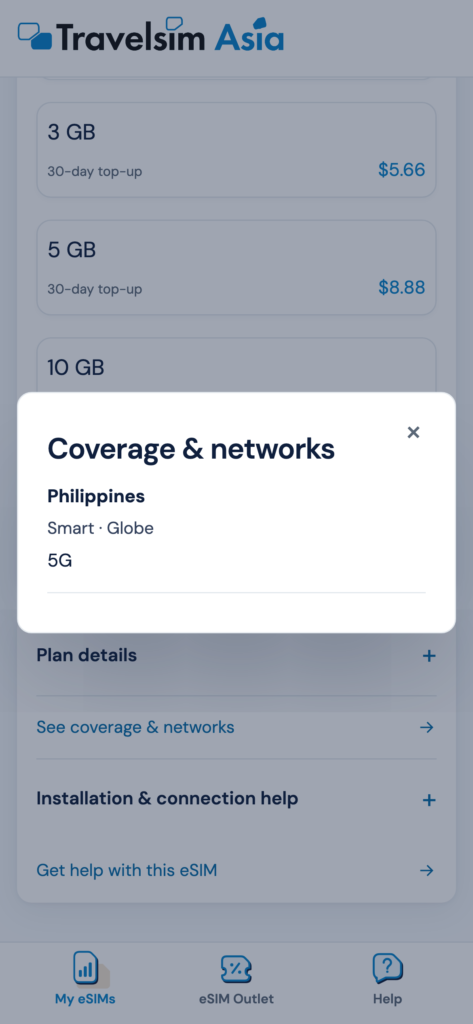
Yes. Travelsim Asia’s Philippine plans give you access to both Smart and Globe, with 5G on compatible phones. This is its biggest advantage for travel inside the country.
Many travel eSIMs for the Philippines use only one network. That works in Metro Manila and Cebu, where both Smart and Globe are solid. It’s a different story on the islands. On Siargao, Bohol or Palawan, one network can be strong on one side of the island and weak on the other.
With access to both, you have more coverage options as you move between towns and islands. Open-water crossings and remote coves can still be out of reach for any SIM, so save maps and pickup details before leaving town. DITO is not included.
This makes Travelsim Asia a strong eSIM for the Philippines for:
- Foreign tourists doing multi-island trips
- Balikbayans and OFWs coming home with an unlocked phone
- Travelers on a multi-country route that includes the Philippines, since both Asia 7 and Asia 14 cover it
Which Networks Does Travelsim Asia Use in Asia?
Travelsim Asia connects to major local operators in each country, with 5G in Japan, South Korea, Thailand, Malaysia and the Philippines. Singapore plans run on 4G.
Destination | Networks |
|---|---|
Philippines | Smart, Globe |
Japan | NTT docomo, KDDI/au, SoftBank, Rakuten Mobile |
South Korea | SK Telecom, LG Uplus |
Thailand | AIS, DTAC |
Malaysia | Maxis, CelcomDigi |
Singapore | M1, Singtel |
Mainland China | China Mobile |
UAE | du |
Is Travelsim Asia good for Japan?
Yes. Japan plans connect to all four major Japanese networks. That covers busy cities like Tokyo, Kyoto and Osaka, and docomo and au reach further into rural areas like Hokkaido and the countryside.
Can you use Google and Facebook in China?
Don’t count on it. Travelsim Asia says its China, Hong Kong and Macau pack routes data through Singapore, but also says that alone doesn’t guarantee any particular app will work. Download offline maps and a translation app before you go, and test the services you rely on as soon as you land.
Does it work for OFWs in the UAE?
There’s a UAE plan on the du network, from $7.99 (₱502) for 1GB. Keep in mind that the UAE blocks most internet calling on local networks. WhatsApp, Messenger and FaceTime voice and video calls won’t connect, even with a strong signal. Text messages and voice notes work fine, and licensed apps like Botim can handle calls.
How to Install Travelsim Asia
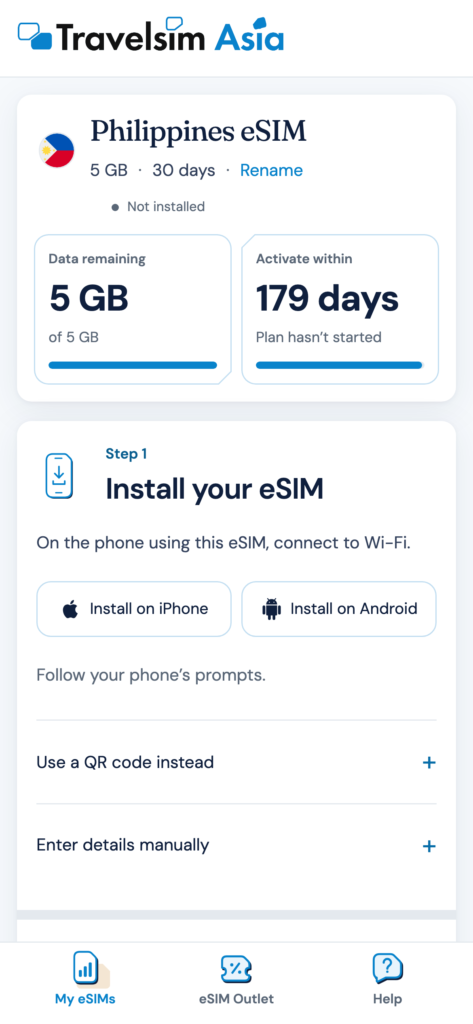
Install the eSIM at home over Wi-Fi before you fly. The plan only starts counting days once it connects to a network at your destination, and you have 180 days from purchase to make that first connection, so installing early costs you nothing.
- Buy your plan on travelsimasia.com.
- Open the email on your phone and tap the install link. Your phone sets up the eSIM on its own.
- No link? Scan the QR code from another screen through your phone’s cellular settings, or type in the activation code by hand.
- On arrival, turn on the Travelsim Asia line and switch on data roaming for it.
How do you keep your Philippine number and bank verifications working?
Since June 2026, Philippine banks and e-wallets have had to move away from SMS OTPs for high-risk transactions such as fund transfers. GCash now sends OTPs inside its app instead of by text. That means many verifications abroad need mobile data, which Travelsim Asia provides, while your Philippine SIM stays on for calls, texts and lower-risk SMS codes. Set it up right after landing:
- Choose Travelsim Asia as your mobile data line.
- Turn data roaming ON for the Travelsim Asia line.
- Keep your Smart or Globe SIM on for calls and texts, but turn its data roaming OFF.
- Turn off Allow Cellular Data Switching on iPhone, or Auto Data Switching on Android. This stops your phone from slipping onto expensive Philippine roaming when the travel signal dips.
- Turn on push notifications for your banking and GCash apps so in-app OTPs reach you.
If data doesn’t work on arrival, the usual cause is data roaming left off on the Travelsim Asia line, or mobile data still set to your home SIM.
Is your phone eSIM-compatible?
Your phone needs eSIM support and must be carrier-unlocked. Most iPhone XS and newer, Samsung Galaxy S20 and newer, and Google Pixel 3 and newer models qualify.
Two things to check:
- Postpaid phones from Smart or Globe may still be locked until the contract ends. Ask your telco for an unlock first.
- Most iPhones sold in Mainland China, Hong Kong and Macau use dual physical SIM trays and have no eSIM.
The quick test: dial *#06#. If you see a 32-digit EID number, your phone supports eSIM.
Travelsim Asia vs Telco Roaming: How Much Can You Save?
On a typical Asia trip, Travelsim Asia costs well under half of Globe’s roaming packs. Globe’s standard Roam Surf rate is ₱399 a day, and its longer packs include 5GB for ₱1,599, 7GB for ₱2,199 and 12GB for ₱3,999. Here’s how three common Filipino trips compare.
Trip | Travelsim Asia | Globe roaming pack |
|---|---|---|
5 days in Tokyo | ₱627 (5GB) | ₱1,599 (5GB) |
7 days in Bangkok | ₱627 (10GB) | ₱2,199 (7GB) |
15 days in Thailand, Malaysia, Singapore | ₱1,444 (10GB) | ₱3,999 (12GB) |
Globe prices are from Globe’s roaming page; check current promos before you buy.
Should you buy a regional pack or separate country plans?
For the Thailand, Malaysia and Singapore trip, there are two ways to buy:
- One 3-country pack ($22.99, about ₱1,444): one data balance that follows you across borders. The easiest option.
- Three country plans ($15.87, about ₱997): for example 5GB Thailand, 3GB Malaysia and 1GB Singapore. Cheaper, but each country has its own separate balance.
If you want simplicity, take the pack. If every peso counts and you know roughly how much you’ll use in each country, split it up. That flexibility is a big part of what makes Travelsim Asia a solid pick for the best eSIM for Asia on a budget.
Who Is Travelsim Asia Best For?
Travelsim Asia suits travelers who want steady, fairly priced data across Asia without installing another app.
- Filipino travelers on Asia trips. Japan, Korea, Thailand and multi-country Southeast Asia routes are all covered, and 5GB to 10GB easily handles maps, Grab, messaging and e-wallets for a week or more.
- Foreign tourists exploring the Philippines. Access to both Smart and Globe means more coverage options across the islands.
- People who don’t want another app. Buying, installing and topping up all happen by email and browser.
- Groups and families. Hotspot is allowed on every plan, so one person can share data with others.
Who should skip Travelsim Asia?
- Heavy streamers and remote workers. Daily HD streaming or long video calls burn through fixed data quickly. The largest plans are 50GB.
- Travelers who need a local number. There’s no SMS or calling, so get a local SIM for that.
Travelsim Asia FAQs
Do I need an app to use Travelsim Asia?
No. You buy on the website, install from the email link or QR code, and manage data and top-ups through a web dashboard. No account or password is needed.
When does my Travelsim Asia plan start?
When the eSIM first connects to a network at your destination. You have 180 days from purchase to make that first connection.
Does Travelsim Asia work with both Smart and Globe?
Yes. Philippine plans give you access to both networks. DITO is not included.
Can I get a refund on Travelsim Asia?
Yes, within 14 days of purchase, as long as the QR code was never scanned and the eSIM was never installed. Once installed, plans can’t be refunded.
Can I share my data through a hotspot?
Yes. Hotspot is allowed on all Travelsim Asia plans at no extra cost. Shared data comes out of your plan’s balance.
Final Verdict: Is Travelsim Asia Worth It?
For Filipinos traveling around Asia, and for anyone island-hopping in the Philippines, Travelsim Asia is one of the simplest and best-value eSIM options available. There’s no app or account to deal with, and it costs well under half of Globe’s roaming packs on the trips compared above. Access to both Smart and Globe in the Philippines adds coverage that many travel eSIMs don’t offer. Choose your regional pack carefully, install before you fly, and set up your home SIM and banking apps before you go.