Disclosure: This article contains sponsored and affiliate links. If you purchase through my links, I may earn a small commission at no extra cost to you. All opinions are my own based on personal travel experience.
Picture this: you just landed at NAIA after a long flight, your roaming is eating through your allowance, and you need Grab right now to get to your hotel. That is the moment most travelers wish they had sorted their mobile data before boarding the plane.
After years of traveling around the Philippines — from Manila to Cebu, Boracay to Siargao — I have tested local SIMs, pocket WiFi, and travel eSIMs. For most trips today, Airalo is my go-to recommendation for the best eSIM for Philippines, and here is my honest take on why, and when you might want a different option.
What Is the Best eSIM for Philippines?
The best eSIM for Philippines for most travelers is Airalo. It is easy to buy before your trip, installs through a simple app, and gives you mobile data the moment you land — no airport queue, no SIM card tray, no local registration paperwork. It is not always the cheapest option per gigabyte, but it is consistently the most convenient for tourists who want Google Maps, Grab, WhatsApp, Messenger, and hotel apps ready before they even clear immigration.
Table of Contents
What Is an eSIM, and Is It Available in the Philippines?
An eSIM (embedded SIM) is a digital SIM card built directly into your smartphone. Instead of inserting a physical SIM, you download a mobile plan over the internet and activate it on your device. Think of it like downloading a SIM card.
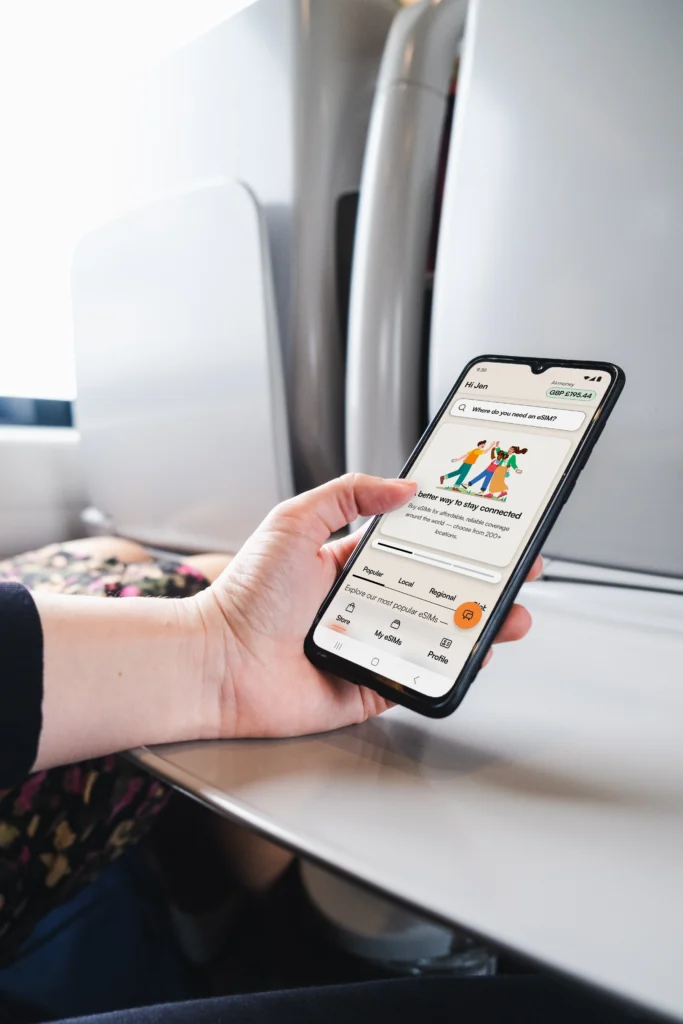
In my experience, the easiest way to understand it: you buy a data plan through an app, scan a QR code or tap “install,” and your phone connects to a local network in your destination — often before you even arrive.
Yes, eSIM is available in the Philippines. Both Globe and Smart offer local eSIM options for tourists and residents. International travel eSIM providers like Airalo also work in the Philippines through local network partners. The key difference? Local Philippine eSIMs and SIMs require registration under Republic Act 11934 (SIM Registration Act), including foreign tourists, while international travel eSIMs like Airalo do not.
Airalo eSIM Philippines Review: Is It Worth It?
Airalo’s Philippines eSIM runs under Alpas Mobile, a local prepaid data-only plan. It does not include a local +63 phone number, standard voice calls, or SMS. For calls and messages, you use apps like WhatsApp, Viber, Messenger, FaceTime, Telegram, or Skype — which is how most travelers communicate anyway.
What I liked:
- Buy before you board. I installed my Airalo eSIM the night before my flight and was on Grab within five minutes of landing. No airport SIM booth, no queue.
- Keep your home SIM active. Because Airalo works as a second line (eSIM), your main SIM stays active for bank OTPs, verification codes, and incoming calls. This is a bigger deal than it sounds.
- Easy top-up. If you run low on data mid-trip, you top up directly inside the Airalo app without reinstalling anything.
- No SIM registration required. This alone saves 20–30 minutes at the airport and eliminates the need to present your passport, proof of Philippine address, and return ticket that local SIM registration requires from foreign tourists.
What it lacks:
- No local +63 phone number
- Not the cheapest per-gigabyte option for heavy data users — though Airalo does offer unlimited data packages at competitive price points for high-usage travelers who would rather not track their consumption. If you are a heavy user, compare Airalo’s unlimited plans against local SIM bundles before deciding.
- Signal still depends on local towers — no eSIM guarantees coverage on every island
- Unlimited plans have a Fair Use Policy (FUP) — typically throttled to around 1Mbps after a daily high-speed threshold
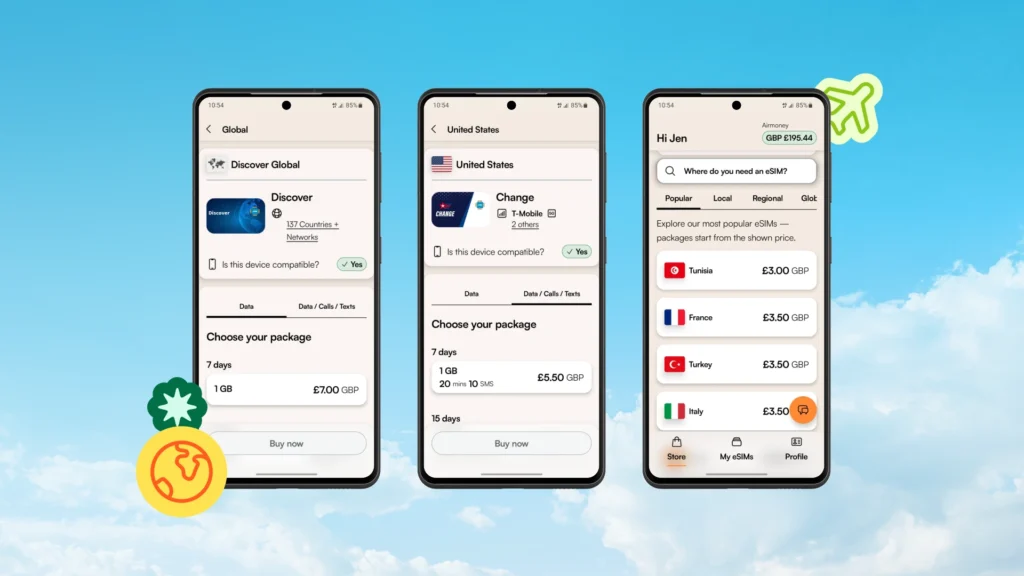
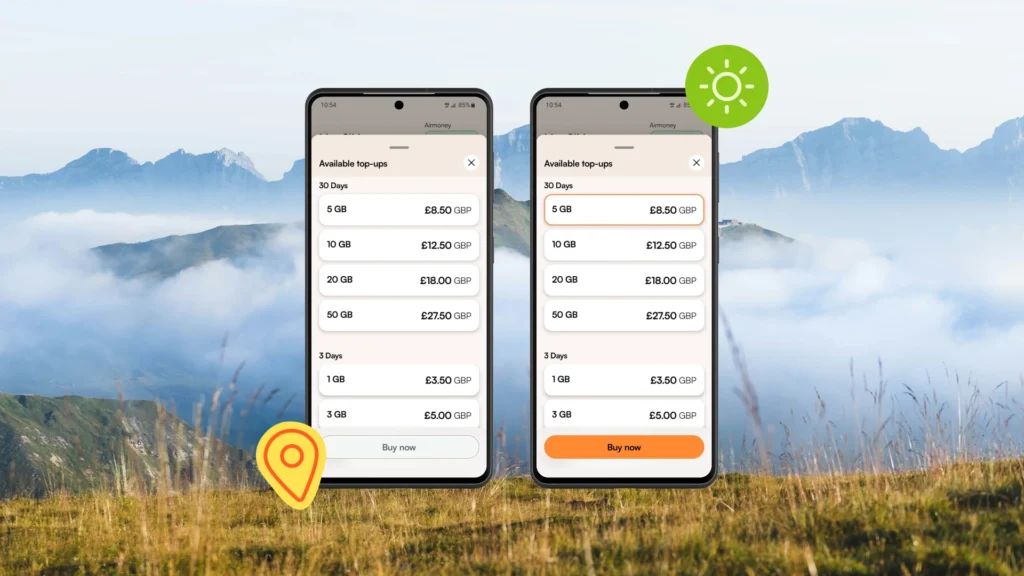
Plan | Approx. Price | Best For |
1GB / 7 days | ~$4–$5 | Short layover or very light use |
3GB / 30 days | ~$7.50–$9.50 | Short trip, light maps and messaging |
5GB / 30 days | ~$11–$13 | Budget tourist, 3–5 day city trip |
10GB / 30 days | ~$18–$21 | 1–2 week trip, regular travel apps |
20GB / 30 days | ~$28–$32 | Heavier browsing, social media |
50GB / 30 days | ~$48 | Heavy use or longer stays |
Network note: Airalo Philippines plans have been listed under both Globe 4G/LTE and Smart 5G depending on the plan. Check the “Network” and “Speed” line at checkout before buying, as this detail can vary by plan and may have changed since this article was published.
Airalo vs Local SIM vs Roaming vs Pocket WiFi
| Option | Best For | Main Drawback |
|---|---|---|
| Airalo eSIM | Travelers wanting data before landing, no physical SIM, no registration | Not cheapest per GB; no local number |
| Globe / Smart Local SIM | More data, local number, calls/texts, longer stays | SIM registration required; tourist SIM valid 30 days only |
| Pocket WiFi | Groups or people with non-eSIM phones | Needs charging; extra device to carry |
| Home carrier roaming | True emergency backup | Usually very expensive per MB |
The SIM registration angle is real. Under RA 11934, foreign tourists registering a local Philippine SIM must present a valid passport, proof of a Philippine address, and a return or onward ticket. Tourist SIMs are also only valid for 30 days.
If you are on a short vacation and just need data for Maps and Grab, Airalo is genuinely easier. That said, Globe’s Traveler SIM packages — which reportedly include options like 80GB for ₱1,500 or 120GB for ₱2,000 per 30 days — offer far more data per peso if you are willing to handle the registration process.
How to Buy and Activate Airalo eSIM in the Philippines
The short version: buy before your trip, install while on WiFi, turn on when you land.
- Check eSIM compatibility. Go to your phone’s Settings and search for “eSIM” or check your carrier’s website. Most flagship iPhones (XS and later), Samsung Galaxy S/Z series, Google Pixel, and many modern Android phones support eSIM. Your phone must also be carrier-unlocked.
- Download the Airalo app (iOS or Android) or visit airalo.com.
- Search for “Philippines” and select your plan based on trip length and data needs.
- Purchase your plan. Use my code LAKBAYPINASNEW for 15% off if you are a new Airalo user → Get 15% off here. Already used Airalo before? Use LAKBAYPINAS for 10% off → Get 10% off here. (Codes valid until 31 December 2026)
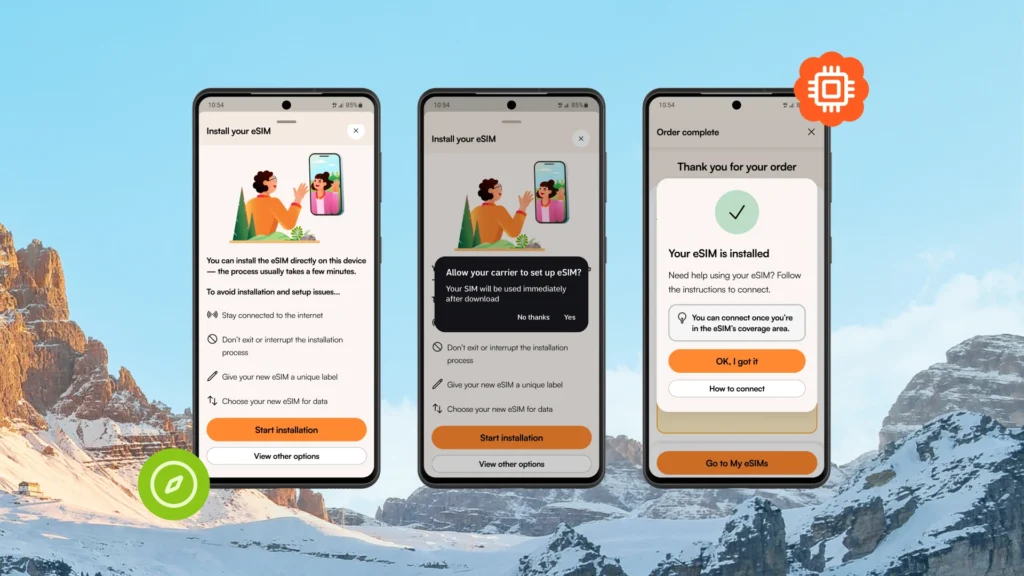
- Install your eSIM via the app (Direct Install) or QR code. You need an internet connection to install — do this on home WiFi before travel.
- Do not activate yet. Keep your home SIM as your primary line.
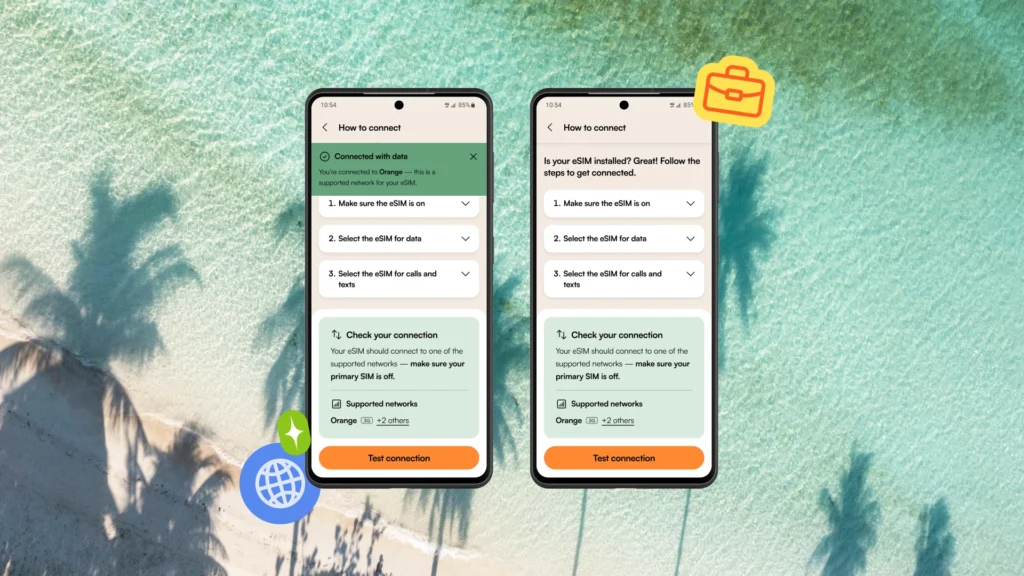
- Set data settings. On iPhone: go to Settings > Cellular > set Airalo eSIM as your mobile data line and enable Data Roaming for it. On Android, steps vary by manufacturer.
- Land in the Philippines. Your Airalo eSIM should connect automatically to the supported network. Open Google Maps or Grab to confirm it is working.
Rooted or jailbroken devices may not work with the Airalo app. Airalo also notes that devices must be carrier/network unlocked and eSIM-compatible before purchase.
How to Transfer eSIM to Another Phone
This is one of the most asked questions, and the honest answer is: it depends, and often you cannot.
Most eSIM profiles — including many Airalo plans — are tied to the device they were installed on. Once installed, they cannot be transferred to a new phone. If you upgrade phones mid-trip or your phone breaks, you may need to contact Airalo support to request a reissue, which is not always guaranteed.
My advice: install your eSIM on the phone you will actually be traveling with, and do not swap devices mid-trip if you can avoid it. If you are switching phones before your trip, install the eSIM on the new device from the start.
Philippines eSIM Deals and Promo Codes
If you are buying through Airalo, use these codes for a discount:
- New to Airalo? Use code LAKBAYPINASNEW for 15% off → Claim 15% off
- Returning user? Use code LAKBAYPINAS for 10% off → Claim 10% off
Both codes are valid through 31 December 2026. The links above auto-apply the discount at checkout.
Airalo also works for other destinations. If you are a Filipino traveler heading abroad — say, Japan — Airalo is one of my recommendations for the best eSIM for Japan as well, since the same app covers 200+ countries. You can manage all your travel eSIMs in one place.
Who Should Use Airalo and Who Should Choose a Local SIM?
Airalo is best if you:
- Want mobile data ready before your flight lands
- Are visiting for less than 30 days
- Need Google Maps, Grab, Messenger, WhatsApp, hotel and booking apps
- Want to keep your home number active for OTP and bank verification
- Do not want to deal with airport SIM booths or registration requirements
Choose a local Globe or Smart SIM instead if you:
- Need a local +63 phone number for calls and SMS
- Are staying longer than 30 days (you may need to re-register anyway)
- Are a heavy data user who needs the best per-GB value
- Are comfortable with the SIM registration process on arrival
- Are working remotely and need stable high-volume data at the lowest cost
Common eSIM Mistakes to Avoid
| Mistake | What Happens | Fix |
|---|---|---|
| Buying an eSIM on a locked phone | eSIM will not activate | Unlock your phone with your carrier first |
| Installing without WiFi | Installation fails mid-process | Always install on stable WiFi before travel |
| Forgetting to enable Data Roaming | No data despite eSIM being installed | Enable Data Roaming for your Airalo line in Settings |
| Expecting a local phone number | Missed calls, no SMS | Use WhatsApp, Viber, Messenger for calls |
| Assuming it works everywhere | Weak signal in remote islands | Travel with a backup plan for off-grid destinations |
| Trying to transfer eSIM to another phone | Profile may be locked to original device | Install on your travel phone before departing |
FAQs About the Best eSIM for Philippines
What is the best eSIM for Philippines?
For most travelers, Airalo is the best eSIM for Philippines because of its easy setup, no registration requirement, and the ability to buy and install before your trip.
Is Airalo good in the Philippines?
Yes, for data-based travel apps. In my experience, it works well in Metro Manila, Cebu, Boracay, and major tourist areas. Coverage varies in remote islands and mountain areas.
Does Airalo Philippines have a phone number?
No. Most Airalo Philippines plans are data-only and do not include a local +63 number. Use WhatsApp, Messenger, or Viber for calls.
Can I use Airalo for calls and texts?
Not standard calls or SMS. Use VoIP apps like WhatsApp, FaceTime, Telegram, or Viber.
Is Airalo cheaper than a local SIM?
Usually not per gigabyte. Local SIMs offer more data for the price, but require SIM registration. Airalo charges a convenience premium for ease of setup.
Do tourists need to register a SIM in the Philippines?
Yes. Under RA 11934, foreign tourists must register local Philippine SIMs with a passport, proof of Philippine address, and a return/onward ticket. Tourist SIMs are valid for 30 days only.
Can I activate Airalo before arriving in the Philippines?
Yes — and that is the point. You buy and install on home WiFi, then it activates automatically when you connect to the local network after landing.
Does Airalo work in Boracay, Cebu, Palawan, and Manila?
Generally yes in major tourist areas. Remote or off-grid spots may have limited signal regardless of eSIM or local SIM.
Is unlimited eSIM really unlimited?
Not always. Airalo’s unlimited plans typically apply a Fair Use Policy (FUP), reportedly throttling speed to around 1Mbps after a daily high-speed data threshold.
What Airalo plan should I buy for 7 days?
For a 7-day trip with normal travel app use, I recommend the 5GB or 10GB plan.
Can I use Airalo as a hotspot?
Some plans allow hotspot/tethering; check the specific plan terms in the Airalo app before purchasing, as hotspot availability varies.
Why is my Airalo eSIM not working?
Common causes: Data Roaming is off, phone is carrier-locked, or the eSIM profile was installed incorrectly. Go to Settings > Cellular > confirm the Airalo line is set as mobile data and Data Roaming is enabled.
Should I choose Airalo or Globe Traveler eSIM?
Globe Traveler eSIM offers more data for the price but requires registration. Airalo wins on convenience and setup speed. Choose based on your priority: cost vs ease.
Is eSIM better than pocket WiFi in the Philippines?
In my opinion, yes — for solo travelers. eSIM means one less device to charge and carry. Pocket WiFi still makes sense for groups sharing a connection on non-eSIM phones.
Final Verdict: Is Airalo a Good eSIM for the Philippines?
For most tourists, Airalo is my top pick as the best eSIM for Philippines because it solves the single biggest arrival problem: getting online fast without buying a physical SIM, standing in a queue, or completing local SIM registration right after a long flight.
Is it the cheapest option? No. Local SIMs offer better data value per peso. But Airalo is cleaner, faster, and more practical if your main needs are Grab, Google Maps, Messenger, WhatsApp, hotel apps, email, and regular travel browsing.
Before buying, always check the current plan price, network details, speed, validity, and Fair Use Policy inside the Airalo app — eSIM details change, and what is accurate today may shift by the time you travel.
New user? Save 15% with code LAKBAYPINASNEW → Claim discount Returning user? Save 10% with code LAKBAYPINAS → Claim discount
(Valid until 31 December 2026. Affiliate disclosure: I earn a small commission if you purchase through these links, at no extra cost to you.)