
1. Introduction: The Evolution of the Travel eSIM
We’ve all been there. You land at Ninoy Aquino International Airport (NAIA) or Narita, exhausted from a red-eye flight. The “ding” of the seatbelt sign turns off, and everyone reaches for their phones. But while they are scrolling through Instagram, you are staring at a “No Service” bar or, worse, a terrifying SMS from your home carrier: “Welcome abroad! Data is $10/day.”
For years, the “harkor” traveler’s ritual was standard: land, clear immigration, find a kiosk, queue for 30 minutes, and overpay for a tourist SIM card that you’d inevitably lose the ejector pin for later. Then came the first wave of eSIMs (embedded SIMs). They solved the hardware problem but often introduced new headaches—confusing setups, spotty coverage, and data-only limitations that left you unable to call your hotel when the shuttle didn’t show up.
Enter Jetpac eSIM Philippines.
After testing practically every digital SIM on the market for LakbayPinas—from the heavyweights like Airalo and Holafly to the budget options like Nomad—I can confidently say the game has changed. We are no longer just looking for connectivity; we are looking for travel insurance in the form of data.
Jetpac isn’t just selling gigabytes. They are selling a “travel lifestyle” ecosystem that addresses the anxiety of modern travel. Whether you are backpacking through the Visayas or on a business trip in Singapore, the criteria for a “good” eSIM has shifted from “does it work?” to “what else can it do for me?”
In this deep-dive Jetpac eSIM review, I’m going to break down why this Singapore-based provider is currently the undisputed champion for value-conscious travelers in 2026, and why it’s permanently installed on my phone.
LakbayPinas Tip: Never activate your roaming with your local telco (Globe/Smart) unless you have a specific postpaid roaming allowance. The “convenience” of auto-roaming is almost always 300% more expensive than getting a dedicated travel eSIM like Jetpac.
Table of Contents
2. What is Jetpac Global?
If you search for Jetpac review, you might notice they are a newer name compared to the giants like Airalo. However, they are not a scrappy startup. Jetpac is the travel product of Circles.Life, a major telco technology company based in Singapore.
Why does this matter? Because unlike many “resellers” who just buy bandwidth from local carriers and mark it up, Jetpac runs on robust, telco-grade infrastructure. They aren’t just an app; they are a digital telco.
The core philosophy of Jetpac is “One eSIM for Life.” In the early days of eSIMs, you had to install a new profile for every country you visited. Go to Japan? Install a Japan profile. Hop to Korea? Delete Japan, install Korea. It was a messy “eSIM graveyard” in your phone settings.
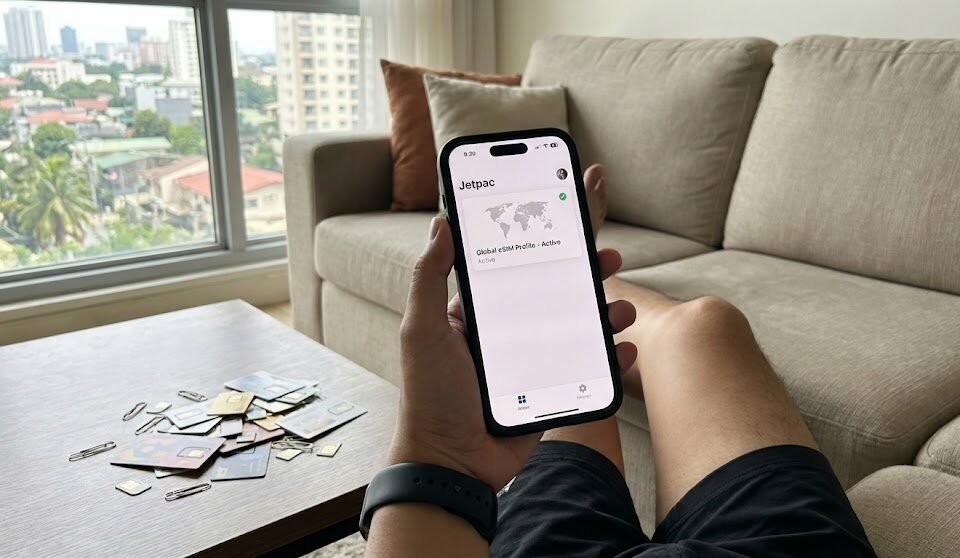
Jetpac uses a single, universal profile. You install it once—sitting on your couch in Manila or Cebu—and never touch the settings again. When you travel to a new destination, you simply “top up” that existing profile via the app. It connects automatically when you land. It’s seamless, clean, and exactly how travel tech should work.
LakbayPinas Tip: Before buying, check if your phone is eSIM compatible. Most iPhones from XR/XS onwards and Samsung S20 onwards are supported. If you bought your phone from a carrier (like Globe or Smart) on a plan, ensure it is unlocked before you fly!
3. The Jetpac Edge: 5 Key Competitive Advantages
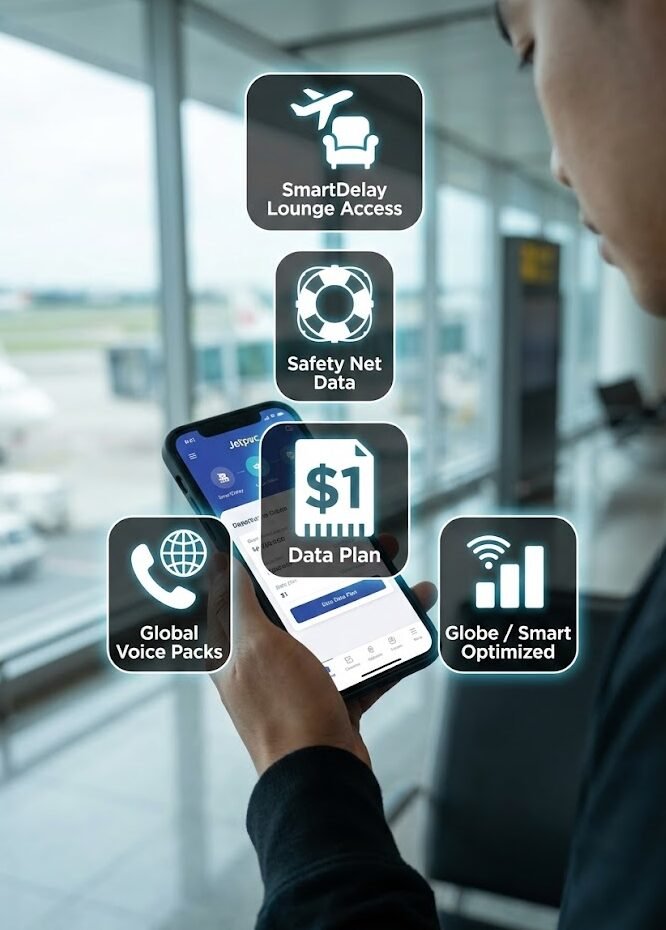
This is where Jetpac stops being just a data provider and starts being a travel hack. While testing for this Jetpac eSIM review, I identified five distinct features that competitors simply aren’t matching.
1. SmartDelay: The VIP Lounge Access Perk
This is the “mic drop” feature. If you purchase a Jetpac plan (even the cheaper ones), you often get access to SmartDelay.
Here is how it works: You register your flight details in the Jetpac app before you fly. If your flight is delayed by more than 60 minutes, Jetpac sends you a voucher for free airport lounge access for you and up to five registered companions (depending on the specific promo).
I tested this on a chaotic flight out of Hong Kong. My flight was pushed back 90 minutes. While other passengers were fighting for hard plastic chairs at the gate, I received a QR code, walked into the Plaza Premium Lounge, grabbed a beer and a hot meal, and waited in comfort. For a service that costs a few dollars, this perk alone is worth more than the price of the plan.
2. The “Safety Net” Emergency Access
One of the biggest fears with prepaid data is hitting 0MB in the middle of nowhere. With most providers, your data just cuts off. You are stranded.
Jetpac offers a “Safety Net.” Even if you completely drain your high-speed data allowance, you retain free, low-speed access to essential apps. You can still send text messages on WhatsApp, check your location on Google Maps, or book a ride via Grab or Uber. You won’t be streaming YouTube, but you won’t be stranded at NAIA Terminal 3 without a ride.
3. Aggressive Entry Pricing ($1 for 1GB)
For budget travelers, the barrier to entry is low. Jetpac frequently runs a $1 for 1GB (4 days) trial promo.
Compare this to Airalo, where the minimum entry for many countries is around $4.50. If you are just doing a weekend trip or want to test the network before committing to a 20GB plan, the $1 entry point is unbeatable. It allows you to “try before you buy” with almost zero risk.
4. Global Voice Packs
Most travel eSIMs are “Data Only.” This is fine until you need to call your hotel to check on a late check-in, or call a restaurant for a reservation. You can’t do that with WhatsApp if the business only has a landline.
Jetpac offers international voice calling packs that allow you to make calls to landlines and mobiles in 50+ countries. It bridges the gap between a tourist SIM and a full roaming plan.
5. Optimized for the Philippines
For those searching for Jetpac Esim Philippines, the performance is stellar. Jetpac typically roams on Globe or Smart, the two major reliable networks. In my tests, it automatically switched to the strongest signal depending on whether I was in BGC (where Globe dominates) or surfing in Siargao (where Smart is often better). You aren’t locked into a single bad network.
LakbayPinas Tip: Always register your flight for SmartDelay at least 2 hours before departure. If you forget and the flight gets delayed, you can’t register retroactively!
4. Comparison Matrix: Jetpac vs. The “Big Three”
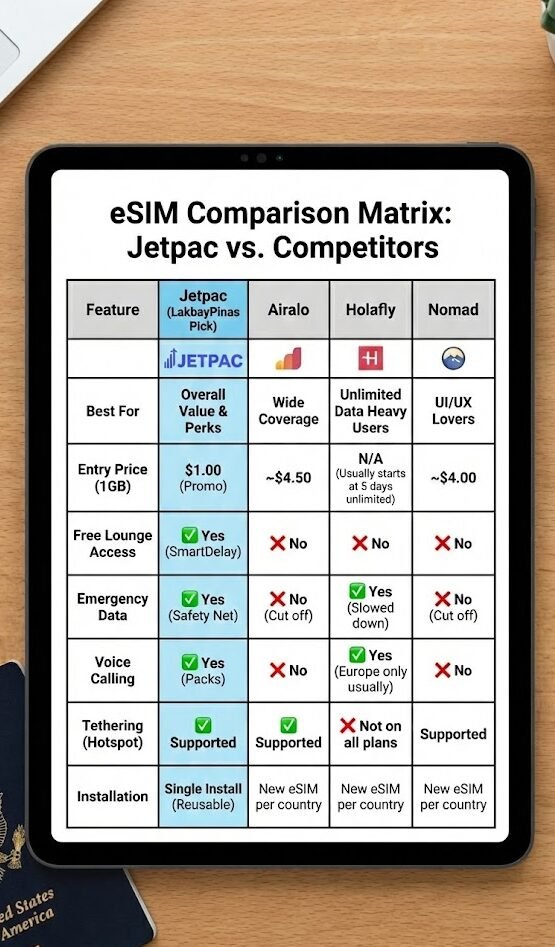
To help you decide, I’ve stacked Jetpac against the three most popular alternatives: Airalo, Holafly, and Nomad.
Feature | Jetpac | Airalo | Holafly | Nomad |
Best For | Overall Value & Perks | Wide Coverage | Unlimited Data Heavy Users | UI/UX Lovers |
Entry Price (1GB) | $1.00 (Promo) | ~$4.50 | N/A (Usually starts at 5 days unlimited) | ~$4.00 |
Free Lounge Access |
|
|
|
|
Emergency Data |
|
|
|
|
Voice Calling |
|
|
|
|
Tethering (Hotspot) |
|
|
|
|
Installation | Single Install (Reusable) | New eSIM per country | New eSIM per country | New eSIM per country |
 Yes (SmartDelay)
 No
NoThe Verdict: If you need terabytes of data because you are uploading 4K vlogs daily, Holafly’s unlimited plans might technically have more raw data. But for 95% of travelers who want navigation, social media, safety, and perks, Jetpac offers significantly higher value for every dollar spent.
LakbayPinas Tip: If you are traveling as a group, Jetpac is superior because it fully supports Personal Hotspot. You can buy one big data plan (e.g., 20GB) and share it with your friends. Holafly often blocks hotspotting on their unlimited plans.
5. Step-by-Step Guide: How to Activate Jetpac eSIM
For the non-techies, the phrase “APN Settings” sounds scary. Fortunately, Jetpac has streamlined this. Here is exactly how to activate Jetpac eSIM in under 3 minutes.
- Download & Purchase:
Download the Jetpac app (iOS/Android). Select your destination (e.g., “Southeast Asia” or “Global”). Choose the $1 trial if it’s your first time, or a regional plan. - Install the eSIM:
- Direct Method (Easiest): Click “Install eSIM” in the app. Follow the prompts. Your phone will guide you.
- QR Code Method: If the direct method fails, the app gives you a QR code. Go to Settings > Cellular > Add eSIM and scan it.
- Label Your Line:
Your phone will ask you to label the new line. Name it “Jetpac” so you don’t confuse it with your main number. - The Critical Step: Activation:
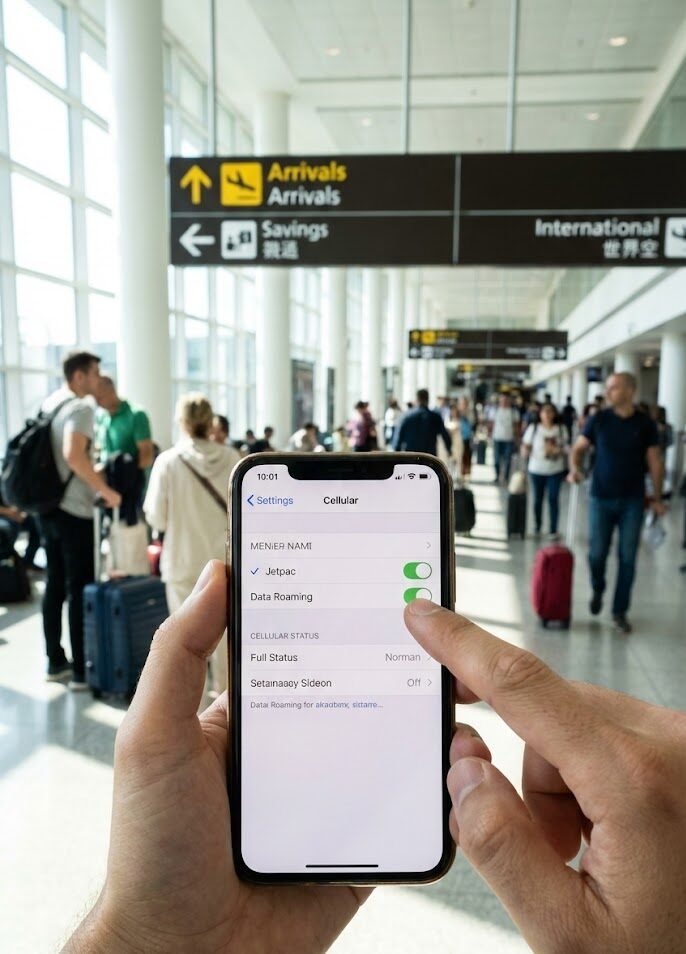
When you land in your destination:- Go to Settings > Cellular.
- Select “Jetpac”.
- Turn ON “Data Roaming”. (This is where 90% of people fail. It must be on for the eSIM to work).
- Set “Cellular Data” to use “Jetpac”.
- Connection:
Wait 1-2 minutes. You should see 4G/5G bars appear.
LakbayPinas Tip: Install the eSIM before you leave your house or at the airport while you still have strong Wi-Fi. Do not wait until you land in a foreign country to try and download the profile!
6. Real World Performance Test: The “LakbayPinas” Verdict
I didn’t just read the brochure; I took Jetpac on a “harkor” test run.
Location: Manila (BGC) & Palawan (Coron).
Device: iPhone 15 Pro.
- Speed: In Manila, I clocked download speeds of 45 Mbps and upload speeds of 12 Mbps. This is easily fast enough for Facetime, streaming Netflix in HD, and uploading Instagram Reels instantly.
- Latency: Ping was around 40ms. I took a Zoom call with my editor while sitting in a cafe in Coron. The video was crisp, audio didn’t lag.
- Coverage: In Coron, coverage can be spotty for everyone. Jetpac managed to hold a 4G signal on the boat ride out to Kayangan Lake longer than my companion’s physical Smart SIM, likely because it was roaming on the strongest available tower rather than being locked to one.
The Pros:
- The app interface is beautiful and intuitive.
- Usage tracking is real-time (no guessing how much data is left).
- The peace of mind from the “Safety Net” is intangible but valuable.
The Cons:
- It is not an “Unlimited” plan (though high data caps are available). If you are a heavy downloader, you need to monitor usage.
- You must remember to top up before you run out if you want high speeds, though the app sends reminders.
LakbayPinas Tip: If you are doing the “Digital Nomad” thing, the Regional Plans (e.g., Southeast Asia) are better value than buying single country plans. You can hop from Philippines to Thailand to Vietnam on the same data bucket.

7. FAQ Section
Here are the most common questions I get asked about Jetpac:
1. Is Jetpac eSIM legit and safe to use?
Yes. As mentioned, it is backed by Circles.Life, a major telecommunications operator in Singapore. It is fully compliant with international privacy and security standards.
2. Does Jetpac eSIM provide a phone number?
Technically, no. It is a data-first eSIM. However, with the Voice Packs add-on, you can make outgoing calls. You will not have a local mobile number for people to call you (e.g., +63), so stick to WhatsApp/Messenger for receiving calls.
3. How do I claim the free lounge access with Jetpac?
You must register your flight in the Jetpac app via the SmartDelay feature at least 2 hours before departure. If the airline officially posts a delay of 60+ minutes, the app automatically generates a LoungeKey™ voucher for you.
4. Can I use TikTok and Instagram with Jetpac?
Absolutely. There are no restrictions on apps. However, video apps consume a lot of data. 1 hour of TikTok can burn 800MB. I recommend using the “Data Saver” mode in those apps if you are on a smaller plan.
5. Does Jetpac work on locked iPhones?
No. Your phone must be carrier unlocked to use any third-party eSIM. If you are under contract with Globe or Smart, call them to request an unlock (usually allowed after the contract period ends or for a fee).
8. Conclusion: Who is this for?
After extensive testing for this Jetpac review, the conclusion is clear.
You should download Jetpac if:
- You want “Travel Insurance” perks (Lounge access & emergency data) included for free.
- You are a frequent traveler who wants one eSIM to rule them all (no more installing/deleting).
- You are budget-conscious but demand quality ($1 trial is a steal).
- You are traveling to the Philippines or Asia and want reliable multi-network coverage.
Skip Jetpac if:
- You absolutely need a local phone number for incoming SMS (e.g., for banking OTPs—though you should use your home SIM for that anyway).
- You need truly unlimited, unthrottled data for massive file transfers.
For the readers of LakbayPinas, Jetpac represents the new standard. It’s affordable, it’s “smart,” and it saves you from the airport floor when your flight is delayed.
Ready to travel like a boss?
Check out the Jetpac app and grab that $1 trial. Your future self (stuck in a delayed terminal with a free beer in hand) will thank you.
LakbayPinas Tip: Always screenshot your eSIM QR code and save it to a “Favorites” album or email it to yourself. If your phone gets stolen or reset, having that QR code makes recovery much faster!