If I wanted a Philippines eSIM that felt simple enough for first-time users but flexible enough for real travel, aloSIM would be one of the first options I would shortlist. Its current Philippines offer is easy to understand: Globe as the supported network, LTE as the expected speed, top-ups available, hotspot/tethering allowed, unlimited-data options, and a phone-number perk included with purchase on the Philippines page. aloSIM also says the product is designed to install quickly before travel and connect when you arrive.
What makes aloSIM more interesting than a plain data-only travel SIM is the extra layer around the data itself. aloSIM says it works in 200+ countries and destinations, is a Canadian eSIM provider, offers 24/7 live chat support, includes 5% back in aloCASH with purchases, and promotes a free international phone number through Hushed on many packages. For travelers heading to the Philippines, that makes aloSIM feel less like a basic prepaid data product and more like a convenience-first travel tool.
Quick Fact
aloSIM Philippines eSIM at a glance | What it means |
Best for | Travelers who want prepaid mobile data without roaming fees |
Supported network in the Philippines | Globe |
Expected speed | LTE |
Fixed-data plans | Yes |
Unlimited-data plans | Yes |
Top-up available | Yes |
Hotspot / tethering | Yes |
ID required | No |
Phone-number perk | Included with purchase on the Philippines page, delivered through Hushed |
Setup style | Install before the trip, automatically connects on arrival |
Support | 24/7 live chat and email support |
Loyalty program | 5% back in aloCASH |
Biggest strength | Easy app-based travel setup with flexible plan choices |
Main limitation | The included number is not a native Philippine local mobile number |
My short verdict is simple: yes, aloSIM is a good Philippines eSIM for many travelers. It works best for people who want to sort out connectivity before the flight, avoid roaming surprises, and keep the option to top up later without hunting for a physical SIM kiosk after landing.
The biggest tradeoff is also clear. If your top priority is a standard local Philippine number, aloSIM is not really built around that use case. Its phone-number perk comes through Hushed, which is useful, but it is not the same thing as buying a local prepaid SIM from a Philippine telco.
Table of Contents
What is aloSIM and how does it work as a Philippines eSIM?
aloSIM is a travel eSIM provider that sells prepaid mobile data for 200+ destinations. In plain terms, it replaces the old routine of landing, finding a SIM stall, swapping cards, and hoping everything works. Instead, you choose a plan, install the eSIM on your compatible phone, and use that eSIM for mobile data while traveling.
That is the main appeal of a Philippines eSIM in the first place. You are not buying it because it sounds trendy. You are buying it because you want to avoid wasting time after arrival and you want mobile data ready when you actually need it. Plus, you can top up anytime.
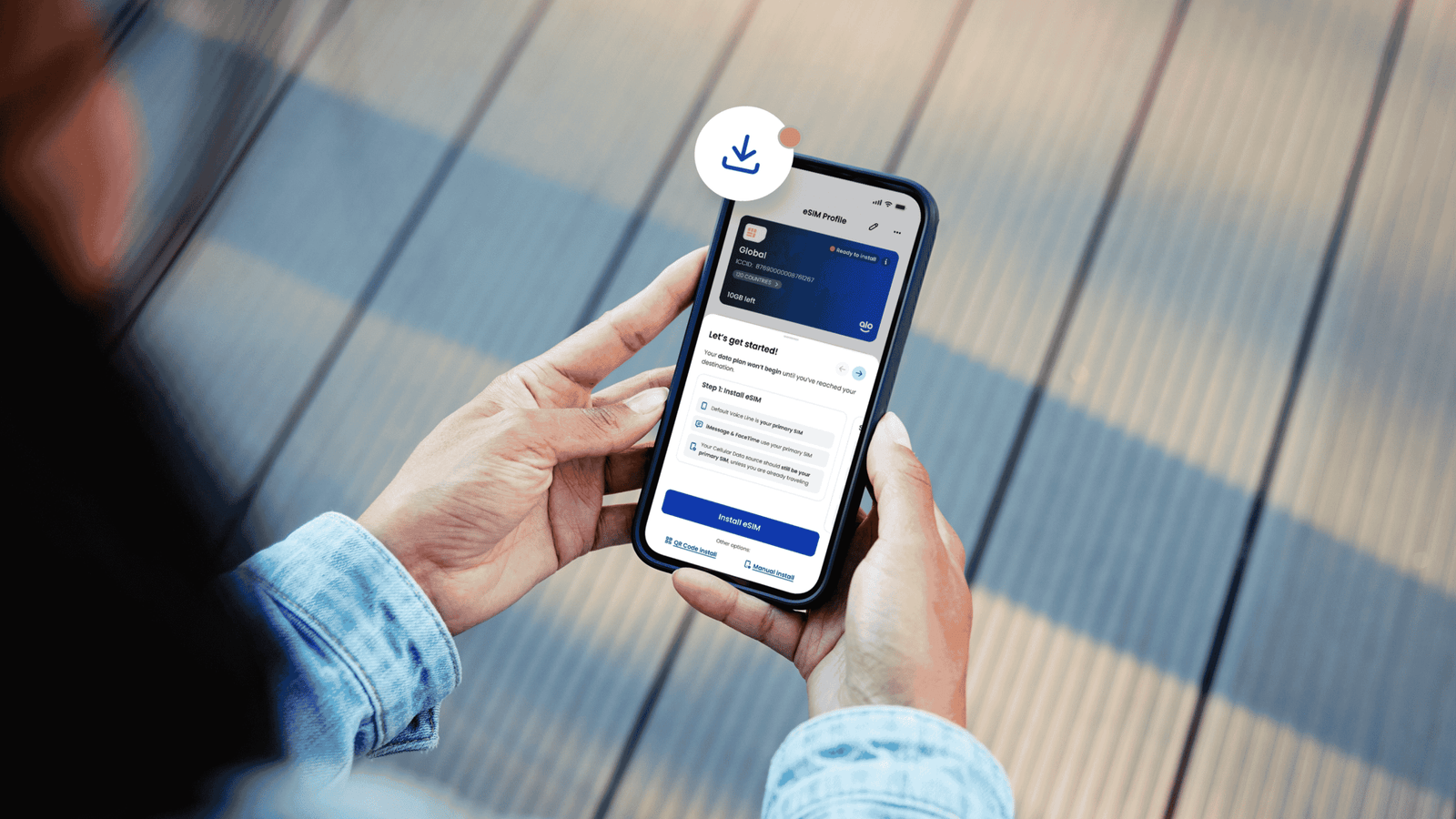
The basic aloSIM workflow is easy to understand:
- download the free app
- choose your country or regional plan
- buy the data package
- install the eSIM before departure
- toggle it on shortly before arrival at your destination
- arrive in the Philippines and let it connect automatically
For travelers, that setup matters because arrival day in the Philippines often moves fast. You might need to book a Grab from the airport, message a hotel, find your terminal, check a reservation, or contact a tour operator. A product like aloSIM is built around making that moment easier.
Why would I use a Philippines eSIM instead of roaming?
For most travelers, the answer is price plus convenience.
Roaming is easy in theory because your regular line is already there, but it is also one of the easiest ways to overspend while traveling. A prepaid Philippines eSIM gives you a much cleaner setup. You choose a package before the trip, use it during the trip, and top up only if you actually need more data.
That matters in the Philippines because data is often part of the trip itself, not just a background utility. You will probably use mobile data for:
- Grab and airport transfers
- Google Maps
- hotel and Airbnb check-ins
- messaging local contacts
- tour coordination
- ferry or bus schedules
- social media uploads
- last-minute itinerary changes
Could you rely only on free Wi-Fi? Sometimes, yes. But in real travel, that is not something I would build an entire trip around. Wi-Fi may be slow, patchy, unavailable, or inconvenient right when you need it most. That is why prepaid eSIM products are so appealing. They remove the guesswork from your first hours in the country.
If your goal is simple, predictable connectivity, a Philippines eSIM usually makes more sense than leaving everything to roaming or airport Wi-Fi.
What does aloSIM currently offer for the Philippines?
This is the section most readers care about because it answers the buying question directly: what do I actually get if I buy an aloSIM eSIM for the Philippines?
Right now, aloSIM’s Philippines offer includes these core details:
- Globe as the supported network
- LTE as the expected speed
- top-up available
- hotspot/tethering allowed
- no ID or documentation required
- phone number included with purchase on the Philippines page
- availability through country, Asia, and Global plans
That is a strong travel-friendly setup because it covers the basics most visitors want without adding extra friction.
Current aloSIM Philippines plans and features | Details | Best fit |
1GB fixed data | 7 days — $4.50 | Light users, short trips, backup data |
2GB fixed data | 15 days — $7.00 | Budget travelers with light daily use |
3GB fixed data | 30 days — $9.00 | Casual users who mostly need maps and messaging |
5GB fixed data | 30 days — $12.00 | Balanced choice for moderate travel use |
10GB fixed data | 30 days — $20.00 | Longer trips, frequent navigation, social posting |
20GB fixed data | 30 days — $30.00 | Heavy users who still prefer a capped plan |
Unlimited data | 3 days — $11.50 | Heavy use on a short stay |
Unlimited data | 5 days — $19.50 | Long weekend or city break with higher usage |
Unlimited data | 7 days — $27.00 | One-week trips with regular uploads and hotspot use |
Unlimited data | 10 days — $35.00 | Travelers who use maps, video, and tethering often |
Unlimited data | 15 days — $49.00 | Longer stays with heavier daily data habits |
Unlimited data | 30 days — $72.50 | Digital nomads, long-term stays, content-heavy travel |
Supported network | Globe | General Philippines coverage via supported local network |
Expected speed | LTE | Suitable for normal travel tasks |
Top-up | Yes | Helpful if your data needs change mid-trip |
Hotspot / tethering | Yes | Useful if you need data on a laptop or second device |
ID requirement | No | Faster and more convenient digital purchase |
Phone perk | Included with purchase | Extra calling/texting value through Hushed |
What I like about this plan ladder is that it does not force every traveler into one type of package.
- A budget traveler can stay cheap with a smaller data plan.
- A short-stay tourist can choose a light or mid-range option.
- A longer-stay traveler can move up to 10GB or 20GB.
- A heavy user can go for unlimited.
- A returning traveler can top up instead of starting over.
That flexibility makes aloSIM easier to recommend because the plans fit different travel styles.
There is one detail worth keeping clear in any honest review: the unlimited-data fair usage policy. The unlimited plans include 2GB of high-speed data per day, and once you hit that threshold, your speed drops to 512 KBPS until the next day. That does not make the plans bad, but it does mean “unlimited” is not the same as full-speed unlimited all day.
Is aloSIM easy to set up before a trip to the Philippines?
Yes, and this is one of aloSIM’s strongest advantages.
The whole point of a Philippines eSIM is to make travel easier before you even board your flight. aloSIM fits that logic well because the setup flow is simple:
- buy the plan
- install the eSIM
- toggle it on before travel
- arrive in the Philippines and let it connect
For travelers, this matters a lot. I would rather sort everything out calmly at home than try to fix connectivity problems after landing, especially if I am tired, in a rush, or navigating an unfamiliar airport.
aloSIM also recommends installing the eSIM 1 day before the trip while you still have a strong Wi-Fi or mobile connection. That is good advice. Airport Wi-Fi is not always reliable, and arrival-day setup is exactly the kind of stress most people are trying to avoid.
That said, I would not pretend eSIM setup is completely foolproof. Like other travel eSIM products, aloSIM still depends on a few technical basics being correct:
- your phone must be eSIM-compatible
- your device should be unlocked
- Data Roaming must be ON for the aloSIM line
- Data Roaming should stay OFF on your primary home SIM
- your APN may need to be set correctly
- network selection should stay on Automatic
These are worth mentioning because they affect the real user experience. If you do the installation early and follow the setup steps carefully, aloSIM should feel easy. If you rush it at the last minute, any eSIM can suddenly feel more complicated than it needs to be.
So my practical setup advice is simple:
- install early
- check device compatibility first
- confirm your phone is unlocked
- read the instructions carefully
- do not wait until boarding or landing
That is the safest way to make a Philippines eSIM feel genuinely convenient.
What are aloSIM’s best features for travelers going to the Philippines?
This is where aloSIM starts to feel more complete than a basic “buy data and disappear” product.
1. Flexible prepaid plan choices
The current Philippines lineup gives travelers a wide range of choices, from 1GB for 7 days to 20GB for 30 days, plus several unlimited tiers. That is important because not all travelers use data the same way.
Some people only need:
- maps
- messaging
- ride-hailing
- booking confirmations
Others need much more:
- hotspot use
- video calls
- constant uploads
- remote work access
- social content creation
aloSIM’s range makes it easier for different types of travelers to find something that fits.
2. In-app top-ups
Top-ups sound like a small feature until you actually need one. Travel plans change. Delays happen. Side trips happen. Work comes up. If you burn through more data than expected, being able to top up inside the app is much easier than scrambling for a different SIM solution halfway through the trip.
That alone makes aloSIM more flexible than a one-shot prepaid setup.
3. Hotspot and tethering support
This is a very practical feature for travelers carrying more than one device. If you need to connect a laptop, share data to a tablet, or use your phone as a backup work connection, tethering matters.
This makes aloSIM especially relevant for:
- remote workers
- digital nomads
- content creators
- travelers carrying multiple devices
4. Free international phone number through Hushed
This is probably aloSIM’s most distinctive selling point.
Instead of offering only mobile data, aloSIM also includes access to a free international phone number through Hushed on many eligible packages. That gives the product a more useful travel angle than a plain data-only eSIM.
For real travel, that can help with:
- calling a hotel
- texting a driver
- confirming a pickup
- keeping a separate travel number
- having a backup communication line abroad
It is important to say this clearly: this is not the same as getting a native local Philippine mobile number. But it is still a genuinely useful bonus for travelers who want more than just data.
5. Loyalty rewards through aloCASH
aloSIM offers 5% back in aloCASH with every purchase. That adds a nice repeat-use benefit, especially for travelers who take multiple trips a year and want one eSIM app they can keep returning to.
For a one-time vacation, this is a small bonus. For frequent travelers, it becomes a more meaningful value add.
6. 24/7 support
Support is one of those features travelers usually ignore until something goes wrong. Then it suddenly becomes the most important feature in the product.
aloSIM promotes 24/7 live chat support, which is a strong trust signal for a travel product. Connectivity issues never happen at a convenient time. They happen when you are checking in, boarding, transferring, or trying to navigate somewhere unfamiliar. So the support promise matters.
How useful is the Hushed phone-number perk, really?
This feature deserves its own section because it is easy to misunderstand.
At its core, aloSIM is still a data eSIM product. The phone-number perk exists because aloSIM bundles a bonus through Hushed, its sister app. That means the value is real, but it is important to frame it correctly.
Here is why the Hushed perk can still be useful:
- it gives you a second communication option while abroad
- it can help with travel-related calls and texts
- it lets you keep your main number more private
- it adds flexibility beyond pure mobile data
In actual travel use, I can see it being useful for:
- hotel coordination
- airport pickup communication
- tour confirmations
- travel admin
- temporary calling and texting during the trip
The limitation is also obvious: this is not a native local Philippine number. So if your ideal setup is a standard local number tied directly to a local SIM experience, aloSIM is not trying to be that.
But if your main goal is:
- easy prepaid travel data
- simple setup
- a backup communication option
- fewer arrival-day hassles
then the Hushed perk adds real value to the overall package.
What does aloSIM do well, and where should travelers keep expectations realistic?
A sponsored review works much better when the strengths and tradeoffs are both clear.
What aloSIM does well
- Prepaid structure with no contracts
- No roaming-fee positioning
- Clear Philippines setup with Globe support
- LTE for everyday travel use
- Top-ups for plan flexibility
- Hotspot support for multiple devices
- Unlimited options for heavier users
- No ID requirement for a simpler digital purchase
- 5% back in aloCASH
- 24/7 live chat support
- Hushed phone-number bonus for added communication value
Those strengths make aloSIM easy to position as a convenience-first Philippines eSIM.
Where travelers should stay realistic
- you still need an eSIM-compatible phone
- your phone should be unlocked
- setup still depends on correct settings
- the included number is not a native Philippine local number
- the unlimited plans are not full-speed unlimited all day
- some travelers will still prefer the familiarity of a physical local SIM
That last point matters. aloSIM is strongest when the traveler values convenience before arrival more than the traditional “buy a local SIM after landing” experience.
Who is aloSIM best for?
I would recommend aloSIM most for these travelers:
- first-time visitors to the Philippines
- short-term tourists who want data ready on landing
- digital-first travelers who like managing everything in an app
- remote workers who may want hotspot use or unlimited plans
- repeat travelers who can benefit from aloCASH
- travelers who want live support if something goes wrong
I think it is less ideal for:
- travelers with older or locked devices
- travelers who specifically want a local Philippine number
- travelers who strongly prefer buying a physical SIM in person
That is why I would frame aloSIM as a very good convenience-first Philippines eSIM, not a perfect one-size-fits-all telecom replacement.
Is aloSIM good value for travelers?
Yes, especially if you look at it through the lens of travel convenience rather than just raw data cost.
The cheapest plans work well for travelers who only need light mobile use. The mid-range fixed-data plans are practical for regular vacations. The unlimited options make more sense for people who rely heavily on mobile data for navigation, uploads, work, or tethering.
Value also comes from the extra layers around the product:
- top-up flexibility
- hotspot support
- Hushed phone-number perk
- 24/7 support
- aloCASH rewards
- use across 200+ destinations
If you only compare aloSIM to the cheapest possible local prepaid SIM, you may find cheaper options on the ground. But that is not really the best comparison. The stronger comparison is this: how much convenience are you getting in exchange for being able to set up before the trip, connect on arrival, and manage the whole thing digitally?
For many travelers, that convenience is worth paying for.
Final verdict: Is aloSIM worth it as a Philippines eSIM?
Yes. If I were choosing a Philippines eSIM based on ease of setup, practical travel features, and flexible plan choices, aloSIM would be easy to recommend.
The official Philippines offer is strong enough to justify a dedicated review because it checks a lot of the right boxes:
- Globe network access
- LTE speeds
- top-up support
- hotspot/tethering
- fixed and unlimited plans
- no ID requirement
- 24/7 support
- Hushed phone-number perk
- 5% back in aloCASH
- broader use across 200+ destinations
Its biggest strength is that it reduces friction. You can prepare before the flight, land with a working data setup, and keep managing the plan in-app instead of improvising after arrival.
Its biggest limitation is also straightforward. If your ideal setup is a native local SIM experience with a standard Philippine mobile number, aloSIM is not exactly that. But if your main goal is easy, prepaid, travel-friendly mobile data for the Philippines, it is a solid option and a credible one to feature in a dedicated review.
FAQ: aloSIM Philippines eSIM Review
Does aloSIM work in the Philippines?
Yes. aloSIM offers a Philippines eSIM that supports Globe and is listed with LTE speeds.
Does aloSIM offer unlimited data in the Philippines?
Yes. aloSIM currently offers several unlimited-data plans for the Philippines, with durations ranging from short stays to longer trips.
Is aloSIM’s unlimited plan truly unlimited at full speed?
Not exactly. The unlimited plans include 2GB of high-speed data per day, then speeds drop to 512 KBPS until the next day.
Can I top up my aloSIM plan while I am already in the Philippines?
Yes. aloSIM allows in-app top-ups, which is helpful if your trip extends or your data use is higher than expected.
Does aloSIM include a phone number?
It includes a phone-number perk through Hushed on eligible packages. This is one of aloSIM’s standout features compared to basic data-only eSIMs.
Is the included number a local Philippine mobile number?
No. The included Hushed number is typically an international number, not a native local Philippine number.
Do I need to show ID to buy aloSIM for the Philippines?
No. The Philippines page says no ID or documentation is required.
Can I use hotspot or tethering with aloSIM in the Philippines?
Yes. aloSIM supports hotspot and tethering, which is useful if you need to connect a second device.
When should I install my aloSIM eSIM?
The best approach is to install it before your trip, ideally while you still have a strong Wi-Fi or mobile connection.
When does the data actually start working?
The aloSIM setup is designed so the eSIM connects when you arrive in the Philippines, as long as the installation and settings are correct.
What should I check if the aloSIM data is not working?
The most important things to check are:
- device compatibility
- whether the phone is unlocked
- whether the correct eSIM line is active
- whether data roaming is enabled for the aloSIM line
- whether the APN and network settings are correct
Is aloSIM a Canadian provider?
Yes. aloSIM positions itself as a Canadian eSIM provider.
Does aloSIM have a rewards program?
Yes. aloSIM offers 5% back in aloCASH with purchases, which can be used toward future eSIM purchases.
Is aloSIM available on iPhone and Android?
Yes. aloSIM is available on both the App Store and Google Play.